MyAdminCV › Admin CV guides › How to write an admin CV
How to write an admin CV in South Africa
Ten steps from a blank page to an admin CV that shows how much you handle and how accurate you are.
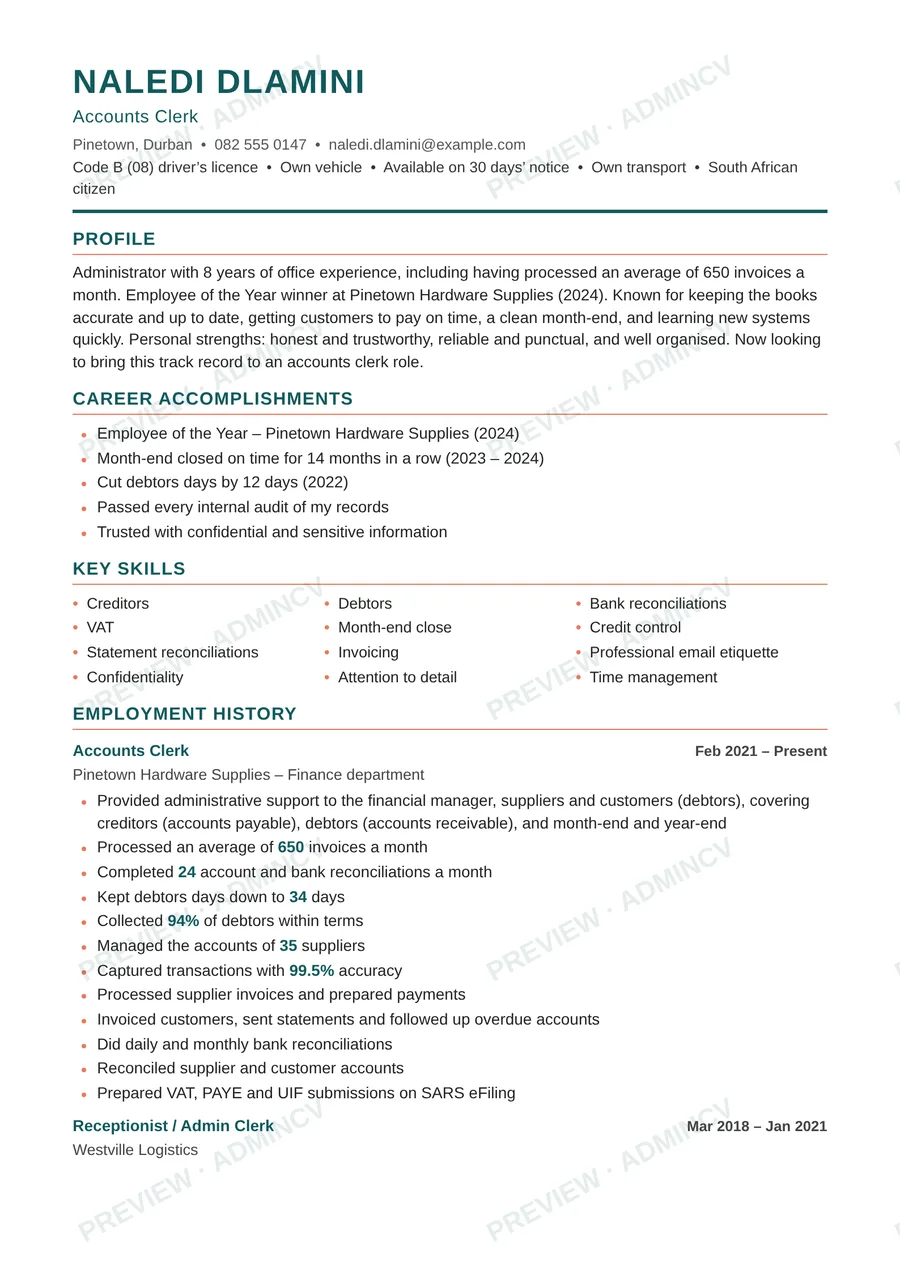
1. Collect your numbers first
Before you write a word, write down what you handle in a normal week. Calls a day, emails a day, documents or invoices a month, people you support, meetings you arrange, petty cash you look after, deadlines you meet. Estimates are fine if you are honest about them ("about 60 calls a day"), and you should be able to explain how you got each one.
2. Choose the job you are applying for
"Admin" covers many jobs. A receptionist CV, a PA CV and a creditors clerk CV need different top lines. Pick the title you want (it will usually be in the advert) and use the same words in your profile.
If you are applying for several kinds of job, make a version of your CV for each kind rather than one CV that tries to cover everything.
3. Contact details
Put your full name, cell number, email address and the area where you live (suburb and town). Use a sensible email address such as name.surname@....
Leave off your ID number, photo and marital status unless the advert asks for them. Some adverts ask for a driver's licence or your own transport, or say you must live near the office: say so near the top if it applies to you.
4. Write a short profile (3 to 4 lines)
The profile is the first thing read. Cover four things: your job title and years of experience, your best number, what you are known for, and the job you want next.
Example profile (made up)
- Receptionist and office administrator with 6 years of experience, including handling an average of 80 calls a day on a busy switchboard. Known for a friendly welcome, accurate record keeping and staying calm when the office is busy. Now looking for an office administrator role.
5. Put your best five highlights near the top
Under the profile, add a short list of your strongest results. Each line should start with a verb, include a number and show a result: action + number + time frame.
Example highlights (made up)
- Processed an average of 600 invoices a month with 99.5% capturing accuracy.
- Took minutes at 18 board and committee meetings a year and sent them out within 2 days.
- Cut the filing backlog by 40% in three months.
- Organised 24 meetings and company events in a year.
6. Employment history
List your jobs from the most recent back. For each: job title, company, town, and start and end dates (month and year). Give the latest job 5 or 6 bullet points and older jobs 2 or 3. Start each bullet with a verb and use past tense for jobs you have left.
Short jobs and contract work count. If there is a gap, a one-line honest reason (study, family, relocation) is better than a silent gap.
7. Skills and systems, named exactly
Many adverts ask for software by name: Excel, Word, Outlook, Sage Pastel, Xero, QuickBooks, SAP, and industry systems such as MedEdi (medical practices) or Legal Suite and LexisConvey (law firms). List the ones you can really use, spelled the way the advert spells them, and be ready to be tested on them.
- Microsoft Word, Excel, Outlook
- Sage Pastel or Xero
- Typing speed (tested)
- Filing and records
- Diary management
- Minute taking
- Telephone etiquette
- Confidentiality
8. Qualifications and certificates
List your highest qualification first. Matric (National Senior Certificate) is the baseline in most adverts. Then add N4 to N6 certificates, diplomas, ICDL, bookkeeping (ICB), payroll or short courses, with the institution and the year.
If you list a typing speed, list a speed you have tested, with the number of words a minute. A free online typing test will show you.
Stuck on a section? MyAdminCV walks you through each one with tap options.
Build my admin CV9. Length and format
Two pages is right for most admin CVs. Use a clean, one-column layout with simple headings, a plain font and no tables or text boxes, because online application systems read them better. Save it as a PDF and name the file with your name, for example Naledi-Dlamini-CV.pdf. Send a Word version only if the advert asks for one.
10. Tailor it to each advert
Read the advert twice and underline what it asks for. Then check that your CV uses the same job title and names the same systems, in your profile, your skills and your top bullets. Put the closing date in your diary and apply early.
Add a short cover letter when you can. See the admin cover letter guide.
Examples for your job
Once your CV is in shape, see the example lines for your kind of job:
[[cards:receptionist-cv,admin-assistant-cv,office-administrator-cv,personal-assistant-cv,accounts-clerk-cv,payroll-administrator-cv]]Questions people ask
- How long should an admin CV be?
- Two pages for most people. Put your latest job in detail and keep older jobs short. A school-leaver with little experience can use one and a half pages.
- Should I put my photo or ID number on my CV?
- No, not unless the advert asks. Your cell number, email address and the area where you live are enough.
- Do I need a cover letter?
- It helps when you can write one. Keep it to one page and name the job and your one or two strongest points.
- What if I have no numbers?
- Estimate honestly. How many calls a day, emails, invoices, visitors or colleagues did you support? Anything you can explain is better than none.
Build your admin CV in about 15 minutes
Answer mostly by tapping on your phone, about 15 minutes. See your whole CV free, then pay R199 once for the PDF. No account, no subscription.
Build my admin CVMore admin CV guides and examples
The examples on this page are made up to show the format. Use your own real details and numbers: an interviewer may ask about anything on your CV.